07 November 2018

Sonarqube cheat sheet

SonarQube Best open source static analyzer.
(IMHO :-) ).

1.
How to create custom plugins for Sonar

https://devwebcl.blogspot.com/2018/10/custom-sonarqube-plugins-63.html

2.
default port: 9000
http://127.0.0.1:9000/

http://localhost:9000/

3.
Maven command line:

mvn sonar:sonar -Dsonar.host.url=http://127.0.0.1:9000 -Dsonar.login=d676f79d8ba83cdcf69f38f8471f0284ee242e09

4.
Quality Gates

Quality Gates are the best way to ensure that standards are met and regulated across all the projects in your organization. Quality Gates can be defined as a set of threshold measures set on your project like Code Coverage, Technical Debt Measure, Number of Blocker/Critical issues, Security Rating, etc.

5.
Quality Profiles

A quality profile in Sonar consists of: A set of activated coding rules among +600 available (PMD, Checkstyle and FindBugs): an activation level (mandatory or optional) and parametrization for each rule.

6.
wsdl jar
to be tested jar wsdl client proxies :

           
                      <plugin>
                <groupId>org.jvnet.jax-ws-commons</groupId>
                <artifactId>jaxws-maven-plugin</artifactId>
                <version>2.3</version>
                <executions>
                    <execution>
                        <goals>
                            <goal>wsimport</goal>
                        </goals>
                        <configuration>
                            <wsdlDirectory>${basedir}/src/main/resources/wsdl/</wsdlDirectory>
                            <wsdlLocation>wsdl/endpoint_sample_wsdl.wsdl</wsdlLocation>

                            <sourceDestDir>${basedir}/src/main/java</sourceDestDir>

7. sonnar-scanner cli

sonar-scanner -Dsonar.projectKey=my-best-project


8. sonar-project.properties
to active a project and be used by sonar cli.
Create an user and generate token, then add to properties file:

# must be unique in a given SonarQube instance
sonar.projectKey=my:project
sonar.login=f86a58b7f520bfc6bbdb5bf03a0671ce64860f0c
sonar.java.binaries=target
 

#to avoid java parsing
sonar.exclusions=**/*.java


9. important not default rules

- https://rules.sonarsource.com/java/RSPEC-3749
  Members of Spring components should be injected

- https://rules.sonarsource.com/java/RSPEC-4288
  Spring components should use constructor injection


31 October 2018

Custom sonarqube-plugins 6.3

A simple example I made for custom plugin in Java: https://github.com/devwebcl/sonarqube-plugins
The visitor Pattern is the core of the solution, similar to Java Parser.


sonarqube-plugins 6.3

This example demonstrates how to write Custom Rules for the SonarQube Java Analyzer (aka SonarJava).
It requires to install SonarJava 4.7.1.9272 on your SonarQube 5.6+
--> actually, it needs a newer version, please check pom.xml
Class FilenamepathDescription
MyFirstCustomCheck.java/src/test/files/A test file, which contains Java code used as input data for testing the rule
org.sonar.template.java.checks. MyFirstCustomCheckTest.java/src/test/javaA test class, which contains the rule's unit test
org.sonar.template.java.checks. MyFirstCustomCheck.java/src/main/javaA rule class, which contains the implementation of the rule.

import org.sonar.api.Plugin;

/**
 * Entry point of your plugin containing your custom rules
 */
public class MyJavaRulesPlugin implements Plugin {
This class is the entry point for the SONAR plugin. This class is extended from org.sonar.api.Plugin class. This class includes server extension which gets instanciated during sonarqube startup, and batch extensions which get instantiated during the code analysis.

/**
 * Declare rule metadata in server repository of rules.
 * That allows to list the rules in the page "Rules".
 */
 public class MyJavaRulesDefinition implements RulesDefinition {
This class is a Server extension that gets instanciated at the time of sonarqube startup. The repository name and supported language name is mentioned in this class
    // server extensions -> objects are instantiated during server startup
    context.addExtension(MyJavaRulesDefinition.class);

    // batch extensions -> objects are instantiated during code analysis
    context.addExtension(MyJavaFileCheckRegistrar.class);

/**
 * Provide the "checks" (implementations of rules) classes that are going be executed during
 * source code analysis.
 *
 * This class is a batch extension by implementing the {@link org.sonar.plugins.java.api.CheckRegistrar} interface.
 */
@SonarLintSide
public class MyJavaFileCheckRegistrar implements CheckRegistrar {
This class is the batch extension which gets instanciated during the code analysis. This class registers all custom rule classes.

/*Rule Activation

The second things to to is to activate the rule within the plugin. To do so, open class RulesList (org.sonar.samples.java.RulesList). In this class, you will notice methods GetJavaChecks() and GetJavaTestChecks(). These methods are used to register our rules with alongside the rule of the Java plugin.*/
public final class RulesList {
This class lists all custom rules and provides the list to the CustomJavaFileCheckRegistrar class to register them with sonarqube

17 October 2018

Eclipse MAT++

1. Retained vs Shallow heap

Shallow is the real size of the object in the heap, meanwhile Retained is the complete memory space used by all the references.


https://help.eclipse.org/mars/index.jsp?topic=%2Forg.eclipse.mat.ui.help%2Fconcepts%2Fshallowretainedheap.html

https://plumbr.io/blog/memory-leaks/how-much-memory-what-is-retained-heap


2. Heap diagram:

Many times, it is not very known the states of objects in Heap memory:

https://mechanical-sympathy.blogspot.com/2013/07/java-garbage-collection-distilled.html


3.  “GC root path”.
Mat can calculate the full path from GC to any class, this way we can see big size objects.

Now, MAT will start calculating the memory graph to show the paths to the GC root where this instance is referenced. This will show up with another page, showing the references as below:


https://dzone.com/articles/java-out-of-memory-heap-analysis


4. MAT resources
A small good tip is about the necessary resources to run mat.

As a rough estimate if the number of objects is N and the number of classes C, it might take at least T bytes to parse and build the dominator tree where:

T ≈ N * 28.25 + C * 1000 + P
P is the space used by the DTFJ or HPROF parsers. For a PHD file, the space could be:
P ≈ C * 1000
Memory Analyzer uses additional memory for caching index files, so performance will be better if there is more memory available than the minimum required to parse a dump.

from: https://help.eclipse.org/mars/index.jsp?topic=%2Forg.eclipse.mat.ui.help%2Ftasks%2Fconfigure_mat.html

5. command line:
Sometimes a good choice to process several heapdumps is to execute thru command line:

sh ./ParseHeapDump.sh /heapdumps/java_7935_heapdump_4p.hprof org.eclipse.mat.api:suspects org.eclipse.mat.api:overview org.eclipse.mat.api:top_components 

 It will create the following reports:

- org.eclipse.mat.api:suspects
- org.eclipse.mat.api:overview
- org.eclipse.mat.api:top_components

02 October 2018

JMX Remote (visualvm)

Arguments for JVM thus VisualVM can connect remotely JMX :

-Dcom.sun.management.jmxremote
-Dcom.sun.management.jmxremote.port=9010
-Dcom.sun.management.jmxremote.local.only=false
-Dcom.sun.management.jmxremote.authenticate=false
-Dcom.sun.management.jmxremote.ssl=false


30 September 2018

TCP/IP Illustrated

RFC793 has several diagrams, in particular, from book TCP/IP Illustrated, Vol. 1: The Protocols, and concise information for this protocol.

IBM has a good replication:


Table 1. TCP state transition description table
TCP connection state Abbreviation in MVS™ console Abbreviation in TSO or UNIX shell Description
LISTEN Listen Listen Waiting for a connection request from a remote TCP application. This is the state in which you can find the listening socket of a local TCP server.
SYN-SENT SynSent SynSent Waiting for an acknowledgment from the remote endpoint after having sent a connection request. Results after step 1 of the three-way TCP handshake.
SYN-RECEIVED SynRcvd SynRcvd This endpoint has received a connection request and sent an acknowledgment. This endpoint is waiting for final acknowledgment that the other endpoint did receive this endpoint's acknowledgment of the original connection request. Results after step 2 of the three-way TCP handshake.
ESTABLISHED Estblsh Establsh Represents a fully established connection; this is the normal state for the data transfer phase of the connection.
FIN-WAIT-1 FinWt1 FinWait1 Waiting for an acknowledgment of the connection termination request or for a simultaneous connection termination request from the remote TCP. This state is normally of short duration.
FIN-WAIT-2 FinWt2 FinWait2 Waiting for a connection termination request from the remote TCP after this endpoint has sent its connection termination request. This state is normally of short duration, but if the remote socket endpoint does not close its socket shortly after it has received information that this socket endpoint closed the connection, then it might last for some time. Excessive FIN-WAIT-2 states can indicate an error in the coding of the remote application.
CLOSE-WAIT ClosWt ClosWait This endpoint has received a close request from the remote endpoint and this TCP is now waiting for a connection termination request from the local application.
CLOSING Closing Closing Waiting for a connection termination request acknowledgment from the remote TCP. This state is entered when this endpoint receives a close request from the local application, sends a termination request to the remote endpoint, and receives a termination request before it receives the acknowledgment from the remote endpoint.
LAST-ACK LastAck LastAck Waiting for an acknowledgment of the connection termination request previously sent to the remote TCP. This state is entered when this endpoint received a termination request before it sent its termination request.
TIME-WAIT TimeWt TimeWait Waiting for enough time to pass to be sure the remote TCP received the acknowledgment of its connection termination request.
CLOSED Closed Closed Represents no connection state at all.


Also, a sequence diagram, where Wikipedia is a good contribution (as usual):

- open: 3 way
- close: 4 way


http://www.icir.org/christian/sock.html

https://www.inetdaemon.com/tutorials/internet/tcp/3-way_handshake.shtml

http://www.tcpipguide.com/free/t_TCPConnectionTermination-2.htm


26 September 2018

21 September 2018

Oracle Traffic Director tuning

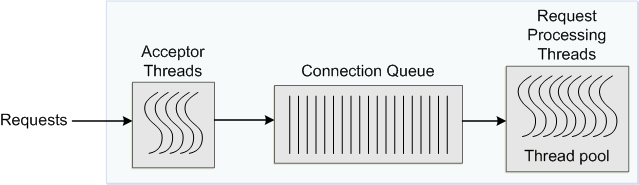
  • Number of acceptor threads

    Acceptor threads receive client requests and put them in the connection queue. When an Oracle Traffic Director instance starts, it creates the specified number of acceptor threads for each listener. If the number of acceptor threads for a listener is not specified, Oracle Traffic Director creates one acceptor thread per CPU on the host.

    Too many idle acceptor threads place an unnecessary burden on the system, while having too few acceptor threads might result in client requests not being accepted. One acceptor thread per CPU, which is the default setting, is an acceptable trade-off in most situations.

    For HTTP 1.0 workloads, which necessitate opening and closing a relatively large number of connections, the default number of acceptor threads—1 per listener—would be suboptimal. Consider increasing the number of acceptor threads.

https://docs.oracle.com/middleware/1221/otd/admin/perf.htm#OTADG799


Description of ''Figure 14-1 Connection Handling in Oracle Traffic Director ''


Description of ''Figure 14-2 Connection Handling in Oracle Traffic Director with Keep Alive Enabled''


https://medium.com/wlsdmforweblogic/how-to-monitor-oracle-traffic-director-otd-components-and-instances-65e90c0cd3c3

28 August 2018

inefable

inefable
 
Del lat. ineffabĭlis 'indecible'.

1. adj. Que no se puede explicar con palabras.

Blog Archive

Disclaimer

Qux